AxiomBlueprint
Network and homelab

IPv4 VLSM Subnet Planner Spreadsheet

Type host counts in any order; get sorted, aligned subnets with masks, ranges and a fit check. Includes a CIDR subnet calculator and 50+ self-tests. What you get. IPv4-VLSM-Subnet-Planner.xlsx. Tests sheet inside the workbook:...

$19one-time price, instant download

Buy now for $19
  • Checkout runs on Gumroad, which takes payment, sends your receipt and delivers the files.
  • Problem with a file? Message us and we will fix or replace it. Refund terms.

Formats: Excel (.xlsx)

Try a free working sample first →

What you can check before you buy

v1.0version · file dated Oct 14, 2026
8visible sheets in the workbook
1,305formulas, all readable in the cells
0formula error cells after a full recalculation
nonemacros in the spreadsheet file

Checked on Oct 14, 2026: the workbook IPv4-VLSM-Subnet-Planner.xlsx was opened and fully recalculated in LibreOffice and no cell showed an error. This is our own check against the sold file, not an outside audit. The template was drafted with AI assistance; its formulas are checked with automated tests and worked examples.

Inside the workbook (from the real file)

input cellformula (hover for the formula)heading

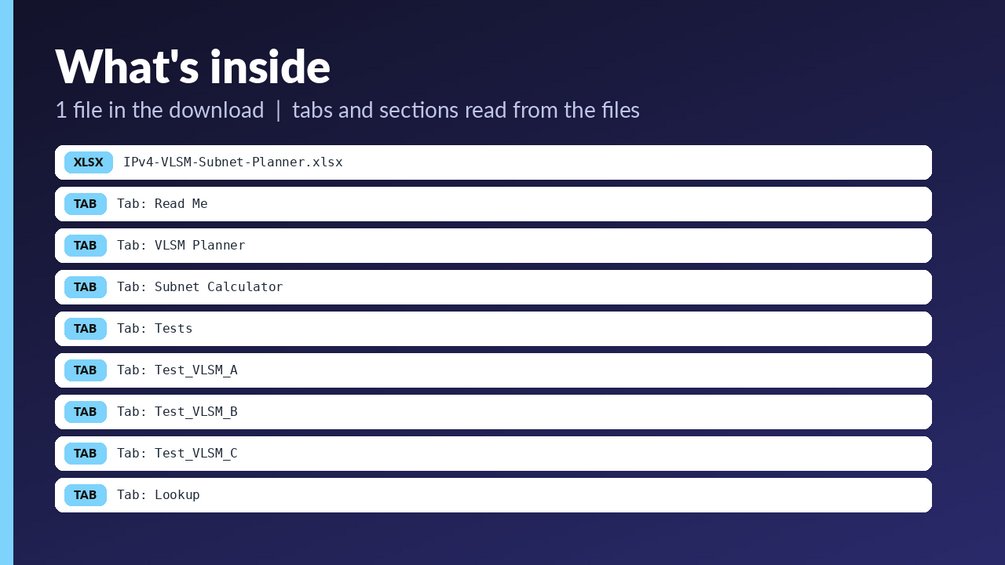
Sheet: Read Me (20 rows, 7 columns)
IPv4 VLSM Subnet Planner Spreadshe
Type host counts in any order; get
How to use
1. Yellow cells are inputs; everyt
2. Open the Tests sheet: it should
3. Grey tabs named T_* / Test_* /
4. Works in Excel 2019/365 and Lib
What this is NOT
Not a macro or add-in (plain formu
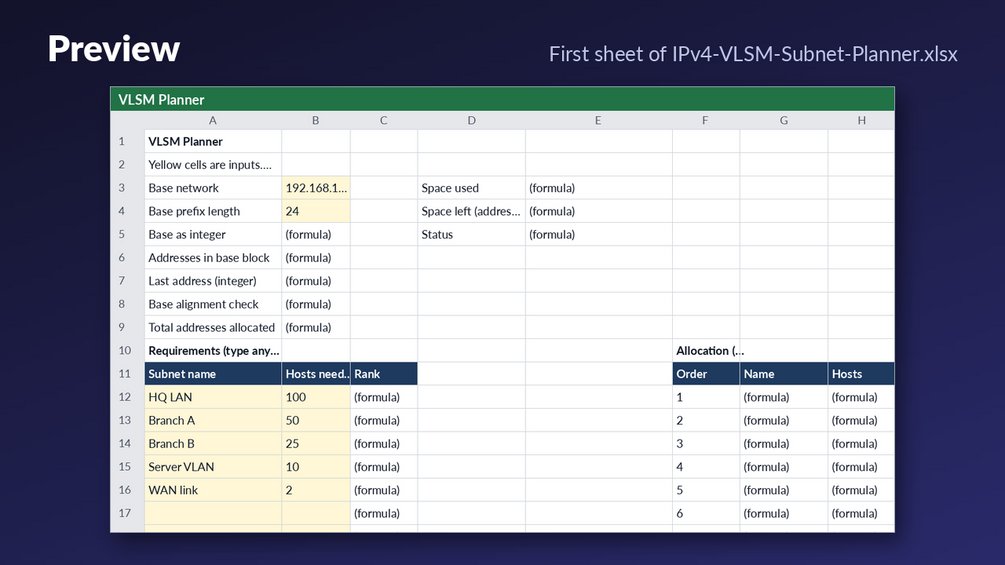
Sheet: VLSM Planner (27 rows, 22 columns)
VLSM Planner
Yellow cells are inputs. Everythin
Base network192.168.1.0Space used0.95
Base prefix length24Space left (addresses)12
Base as integer3232235776StatusAll subnets fit
Addresses in base block256
Last address (integer)3232236031
Base alignment checkOK
Total addresses allocated244
Requirements (type any order)Allocation (computed, largest firs
Subnet nameHosts neededRankOrderName
HQ LAN10011HQ LAN
Sheet: Subnet Calculator (33 rows, 7 columns)
Subnet Calculator
Enter any host IP and a prefix len
IPv4 address192.168.5.77
Prefix length26
Input valid?OK
Network address192.168.5.64
Subnet mask255.255.255.192
Wildcard mask0.0.0.63
Broadcast address192.168.5.127
First usable host192.168.5.65

Preview shows the first rows of each sheet as calculated. Your copy has the full sheets.

What is in the download

Who it is for

  • Network and systems engineers who need to split an IPv4 block into variable-length subnets from a list of host counts.
  • IT admins and consultants who want an auditable spreadsheet rather than an ad-hoc one.
  • Students preparing for networking exams who want to check VLSM and CIDR work against a worked example.

Who it is not for

  • Anyone who needs IPv6, since the workbook is IPv4 only.
  • Anyone who needs an IPAM database. This is a planning spreadsheet, not an address-tracking system.
  • Plans with more than 16 subnets on one sheet. You can copy the sheet to add more. The workbook also has no macros or add-ins. The author did not open it in desktop Excel, and it recalculates on open.

About this template

Type host counts in any order; get sorted, aligned subnets with masks, ranges and a fit check. Includes a CIDR subnet calculator and 50+ self-tests.

What you get

  • IPv4-VLSM-Subnet-Planner.xlsx
  • Tests sheet inside the workbook: every formula checked against hand-computed answers (shows ALL n TESTS PASS)
  • Read Me sheet with how-to, limits and sources

Who it is for: network and systems engineers, IT admins, students preparing for networking exams and consultants who need a reliable, auditable spreadsheet instead of an ad-hoc one.

How to use: open the workbook, type into the yellow cells, read the computed columns; red-highlighted check cells tell you what to fix. Start with the sample data, then overwrite it with yours.

What it is NOT: Not a macro or add-in (plain formulas, works in Excel and LibreOffice). Not an IPAM database. IPv4 only. Max 16 subnets per sheet (copy the sheet for more).

Verification: 65 hand-computed tests (see Tests sheet) pass; the build re-evaluates all 1305 formula cells with an independent formula evaluator and finds 0 errors. NOT opened in desktop Excel by the author: recalculates on open.

*Created with AI assistance and reviewed by the author.*

Questions

What file type do I get, and what does it run in?

You get one Excel file, IPv4-VLSM-Subnet-Planner.xlsx, with 8 sheets. It uses plain formulas with no macros or add-ins, and it works in Excel and LibreOffice.

Can I edit the formulas, and how do I know they are right?

It is a plain workbook with 1305 formulas, so you can inspect them. A Tests sheet checks the formulas against 65 hand-computed answers and shows ALL n TESTS PASS. The author did not open the file in desktop Excel, and it recalculates on open.

How do I start?

Open the workbook, type into the yellow cells and read the computed columns. Red-highlighted check cells show what to fix. Start with the sample data, then overwrite it with your own host counts.
Refunds: refunds follow the rules of the marketplace where you buy; if a file is broken we fix or replace it (details). It is a planning tool, not tax, legal, financial or engineering advice. Check rates, limits and rules against the official source before you rely on them. How we check our files.

Free tools that go with it

Guides

More from Network and homelab